Lb
리소스 아이콘

리소스 개요
Elastic Load Balancing은 수신되는 애플리케이션 트래픽을 EC2 인스턴스 같은 다수의 대상에 자동으로 배포합니다. 또한 등록된 대상의 상태를 모니터링하면서 상태가 양호한 대상으로만 트래픽을 라우팅합니다. Elastic Load Balancing은 다음 세 유형의 로드 밸런서를 지원합니다. Application Load Balancer, Network Load Balancer 및 Classic Load Balancer.
연관 리소스
상위 리소스
연결 리소스
리소스 설정 값
기본 설정
load_balancer_type: ELB 유형 -application,network,gatewayinternal: ELB를 Internet-facing 또는 Internal로 배포 -true,falseincluded_vpc_name: 대상 리소스를 생성할 VPC 이름linked_subnet_names: LB에 연결할 Subnet 이름 목록linked_security_group_names: LB에 할당할 Security Group 이름 목록 (Application LB만 해당)drop_invalid_header: 유효하지 않은 HTTP 헤더 제거 여부 -true,false
리스너 (listener)
listener.protocol: 클라이언트 → 로드 밸런서 연결 프로토콜 -HTTP,HTTPS,TCP,TCP_UDP,TLS,UDPlistener.port: 로드 밸런서가 수신 대기하는 포트listener.default_action_type: 기본 라우팅 작업 유형 -forward,redirect,fixed-responselistener.linked_target_group_name: 트래픽을 라우팅할 Target Group 이름listener.acm_certificate_name: 기본 SSL 서버 인증서 이름listener.ssl_policy: 리스너에 적용할 SSL 정책 이름
리스너 규칙 (rule)
rule.target_listener: Rule을 적용할 Listener 이름rule.priority: Rule 우선순위 -1~50000
고정 응답 (rule.fixed_response)
rule.fixed_response.fixed_response_order: Fixed response 우선순위 -1~50000rule.fixed_response.content_type: 응답 Content-Typerule.fixed_response.message_body: 응답 메시지 본문rule.fixed_response.fixed_response_status_code: HTTP 응답 코드
전달 (rule.forward)
rule.forward.forward_order: Forward 우선순위 -1~50000rule.forward.forward_target_group_list: Forward 대상 Target Group 목록rule.forward.enable_stickiness: Target Group 고착성 사용 여부 -true,falserule.forward.duration: 동일 Target Group으로 라우팅되는 시간(초)
리다이렉트 (rule.redirect)
rule.redirect.redirect_order: Redirect 우선순위 -1~50000rule.redirect.host: 호스트 이름 (#{host} 사용 가능)rule.redirect.path: 절대 경로 (/로 시작)rule.redirect.port: 포트 -1~65535또는#{port}rule.redirect.protocol: 프로토콜 -HTTP,HTTPS,#{protocol}rule.redirect.query: 쿼리 문자열rule.redirect.redirect_status_code: HTTP Redirect 코드 -HTTP_301,HTTP_302
인증 (rule.authenticate)
rule.authenticate.authenticate_type: 인증 방식 -authenticate_cognito,authenticate_oidcrule.authenticate.authenticate_order: 인증 우선순위 -1~50000rule.authenticate.on_unauthenticated_request: 미인증 요청 처리 방식 -deny,allow,authenticaterule.authenticate.scope: IdP에 요청할 사용자 Scoperule.authenticate.session_cookie_name: 세션 유지용 쿠키 이름rule.authenticate.session_timeout: 세션 유지 시간(초) -60~86400rule.authenticate.user_pool_arn: Cognito User Pool ARNrule.authenticate.user_pool_client_id: Cognito User Pool Client IDrule.authenticate.user_pool_domain: Cognito User Pool 도메인rule.authenticate.authorization_endpoint: IdP 승인 Endpointrule.authenticate.client_id: OAuth 2.0 Client IDrule.authenticate.client_secret: OAuth 2.0 Client Secretrule.authenticate.issuer: OIDC Issuerrule.authenticate.token_endpoint: Token Endpointrule.authenticate.user_info_endpoint: User Info Endpoint
조건 (rule.condition)
condition_list: 사용할 Rule 조건 목록host_header: Host header 조건 값path_pattern: Path pattern 조건 값http_request_method: HTTP Method 조건 값http_header_name: HTTP Header 이름http_header_value: HTTP Header 값query_string_key: Query string keyquery_string_value: Query string valuesource_ip: Source IP 조건 값
태그
tag: 리소스를 카테고리로 분류하기 위한 태그 - 최대 512자,key:value
LB 설정 방법
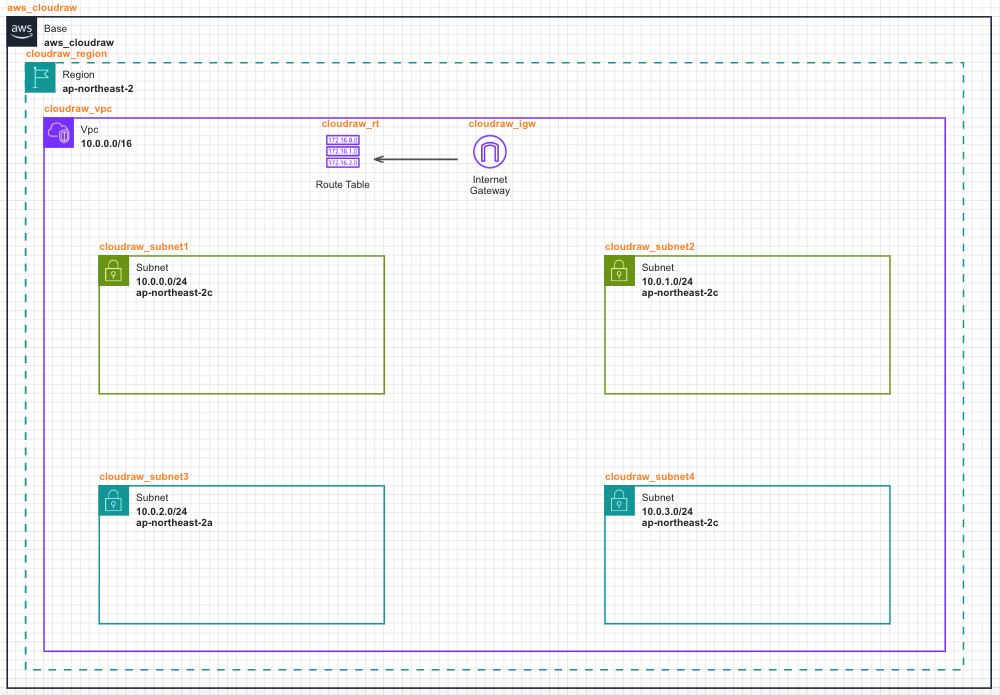
- Base → Region → VPC → Subnet → Internet Gateway → Route Table까지 배치된 상태를 기준으로 Load Balancer 설정을 안내합니다.
- Subnet을 참고하여 상단 2개의 Subnet을 Public Subnet으로 설정합니다.
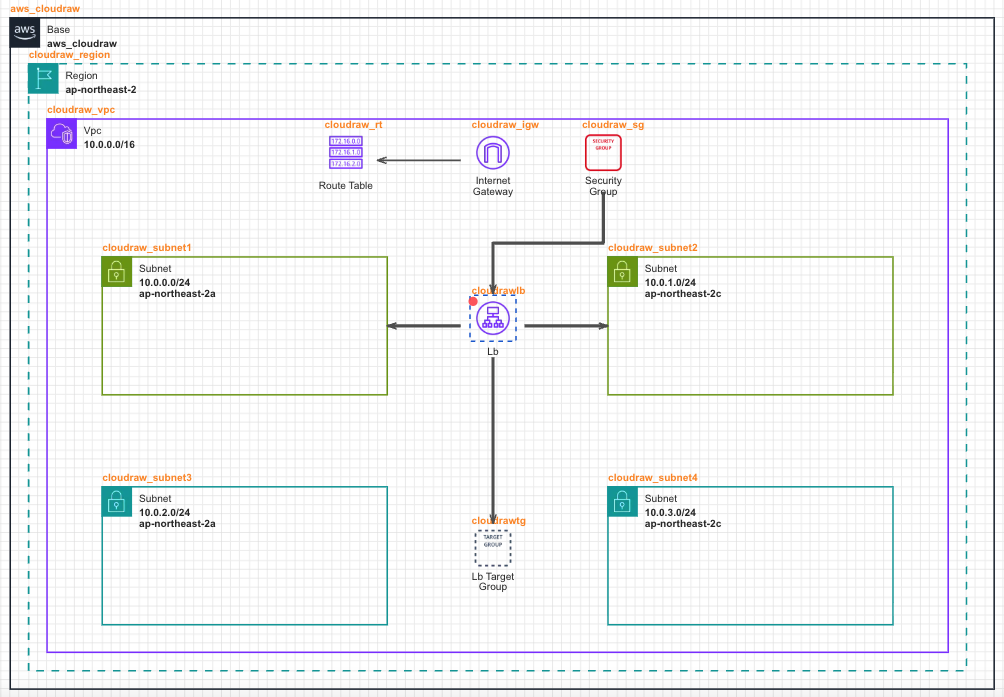
- Security Group을 배치하고 Load Balancer에 연결합니다.
- 외부에서 들어오는 요청을 단일 진입점으로 수신하고, 여러 EC2 인스턴스로 트래픽을 분산 처리하기 위해 Load Balancer를 배치하고 서로 다른 가용 영역으로 설정한 Public Subnet에 각각 연결합니다.
- Load Balancer가 실제로 트래픽을 전달할 대상 리소스 집합을 정의하기 위해 Load Balancer Target Group을 배치하고 [Load Balancer -> Load Balancer Target Group] 방향으로 선을 연결합니다.
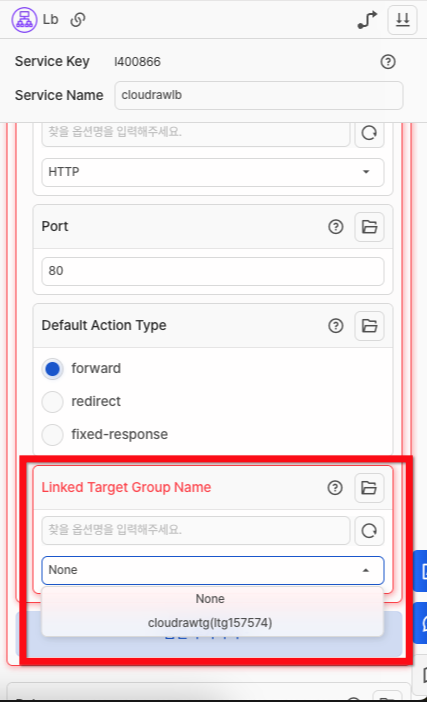
- Load Balancer의 [Listener - Linked Target Group Name] 옵션에서 연결한 Load Balancer Target Group의 이름을 선택합니다.
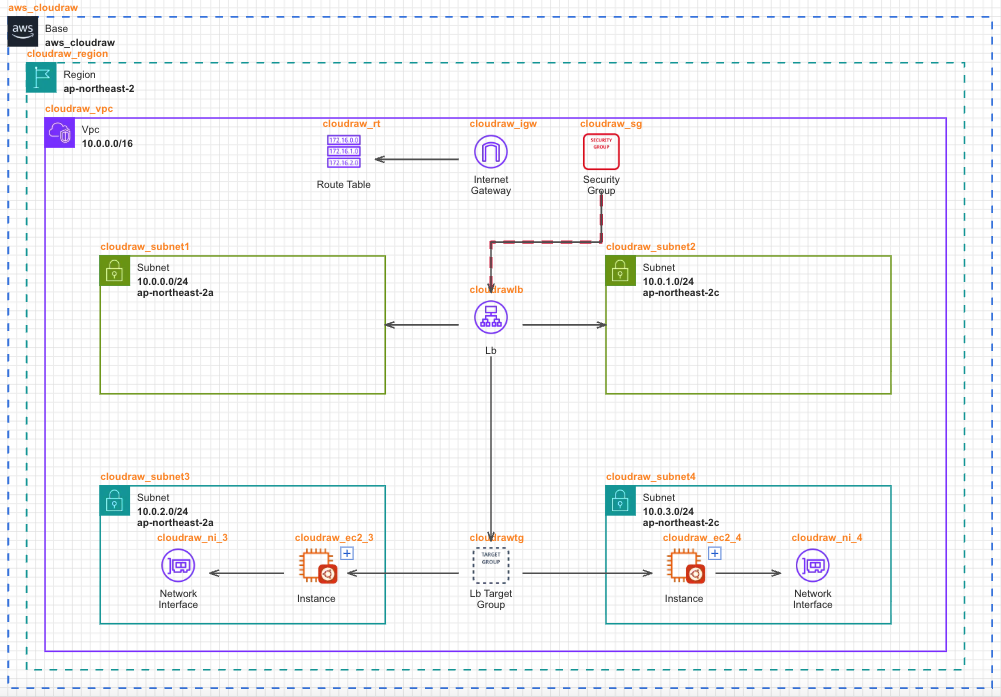
- EC2 Instance, Network Interface를 Private Subnet 영역에 배치한 후, EC2 Instance의 AMI를 설정합니다.
- Load Balancer Target Group으로부터 실제 트래픽을 처리할 EC2 인스턴스 방향으로 선을 연결하여, Load Balancer가 요청을 분산 전달할 수 있도록 구성합니다.